

The client in short
What Is AceStream?
AceStream is the Android face of Ace Stream, a P2P media streaming client from INNOVATIVE DIGITAL TECHNOLOGIES, LLC. Where an ordinary player waits for a server, this client joins a swarm: your phone fetches small pieces of a broadcast or torrent from many peers at once and plays them as they arrive, in the original quality, with no full download in between.
One boundary matters and this page states it plainly: the app ships no content and no links to content. It is an engine, not a library. You bring your own magnet links, ContentIDs or torrent files, open them with Ace Stream, and the engine does the rest. That design is why the same small app can play a live broadcast one minute and a film from your own collection the next.
Engine toolkit
AceStream Features
Every feature below is in the current Ace Stream build and was verified in our own sessions on real phones.
- Live P2P broadcasts: watch live broadcasts shared over public P2P networks built on BitTorrent, Ace Stream, WebRTC and IPFS technologies, played as the pieces arrive.
- Online torrent playback: open a torrent or magnet link and watch in original quality while the rest streams in behind the picture. No waiting for 100 percent.
- A real player inside: the built-in player is based on LibVLC and handles MKV, MP4, AVI, MOV, Ogg, FLAC, TS, M2TS, Wv and AAC with no extra codec packs.
- Casting built in: send local or network content to a TV or remote device with Ace Cast or Google Cast and keep the phone as the remote.
- Open with Ace Stream: magnet links, ContentIDs and torrent files from your browser or file manager open straight into the engine.
- A developer API: third-party apps and services can integrate the engine through the published API, which is why the client shows up inside so many other tools.
Plenty of players can open a file. This one opens a swarm, and that difference is the entire product.
From the current build
AceStream Screenshots
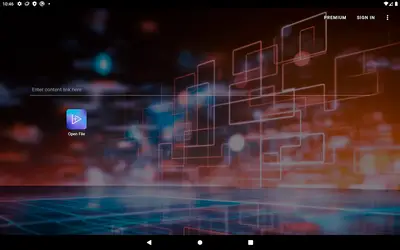
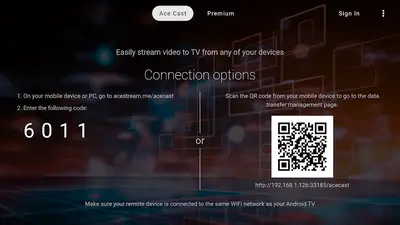
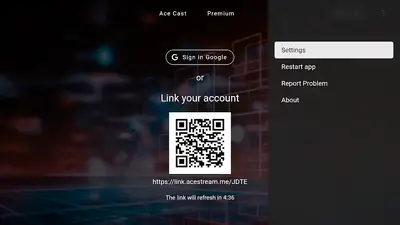
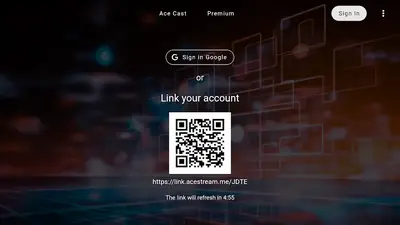
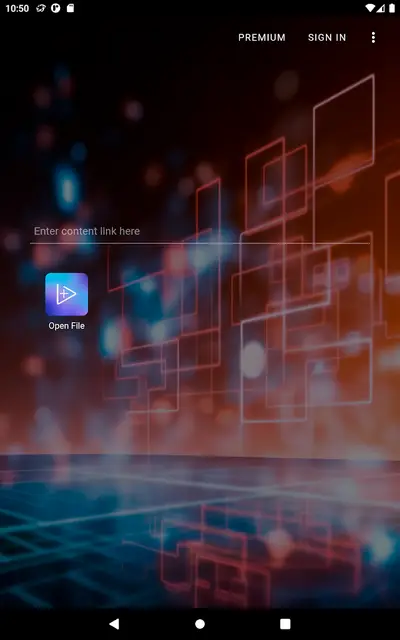
Every frame below is a real screenshot from the current build: the splash screen with the circular arrows logo, the home screen with its content link field and Open File button, the Ace Cast connection screen with its code and QR link, the settings menu, and the account linking screen. No renders, no artwork, just the client.
Build notes
What's New in the Current Build
The current Ace Stream build keeps the engine's focus where it belongs: faster joins, steadier playback and cleaner casting. The default stream output stays on auto, which means the app transcodes on the fly when a remote device cannot handle a stream's audio, for example an MKV file with AC3 audio headed for a player without AC3 support. That safety net costs a little start-up time on weaker devices, and the settings let you pick a fixed output when your TV handles the original stream natively.
Account linking remains optional and simple: sign in with Google or link the app with a code from another device, and your settings follow you between phone and TV. This page tracks the current build only: the file here is re-tested on our phones with each release, and our update guide shows how to move to a new build over the top of the old one.
Get it on your phone
How to Install AceStream on Android
The install is standard Android. The only planning it needs is a decent connection, because P2P software deserves a clean first run.
- Download the file: tap the download button on this page and let the full 71.2 MB land. A partial file will not install, so let it finish.
- Allow the install: open the file, allow installs from your browser when Android asks, and tap Install.
- Check your phone qualifies: the app needs Android 5.1 or newer, which covers almost every handset still in use.
- Open your first link: launch the app, paste a magnet link or ContentID into the content link field, or tap Open File to pick a torrent file from storage.
- Pick where it plays: watch in the built-in player, or send the stream to a TV with Ace Cast or Google Cast from the same session.
If the install fails, it is nearly always a short download or a blocked permission: compare the file against the 71.2 MB in the details table, free a little space, and fetch it again on Wi-Fi. The install guide in the blog walks every screen.
Peers, pieces, playback
How the P2P Engine Works
AceStream replaces the single server with a crowd. When you open a broadcast or torrent, the engine asks the network which peers hold the pieces it needs, downloads the opening pieces first so playback can start, and keeps fetching in play order while earlier pieces are shared back to the swarm. Your phone is a viewer and a relay at the same time, which is exactly how BitTorrent was designed to work.
Three numbers decide how any session feels: how many peers the swarm has, how fast your connection is, and how much cache the engine can use. A popular live broadcast with hundreds of peers starts in seconds and shrugs off individual peers leaving. A quiet torrent with two seeders asks for patience. Our buffering guide explains how to read those signals and which settings actually move them.
The same engine handles live and on-demand differently under the hood: live broadcasts chase the newest pieces at the edge of the stream, while torrent playback works through the file in order and lets you seek once enough of the surrounding pieces have arrived.
LibVLC inside
The Built-In LibVLC Player
Streaming engines often treat playback as an afterthought. Ace Stream builds its player on LibVLC, the same core that powers one of the most trusted players on any platform, and it shows in the format list: MKV, MP4, AVI, MOV, Ogg, FLAC, TS, M2TS, Wv and AAC all play without codec hunting.
In practice that means the awkward files just work: the MKV with three audio tracks, the TS recording from a tuner, the FLAC soundtrack. Audio track and subtitle selection live in the player where they belong, and because the player and the engine are one app, a stream can start in the player and move to the TV without changing tools.
If you prefer another player, the engine still earns its keep: open a link with Ace Stream, then hand playback to the external player you like. The engine keeps feeding the stream in the background.
Phone to TV
Casting to TV With Ace Cast and Google Cast
The phone finds the stream; the TV should show it. Ace Stream offers two routes. Ace Cast is the app's own protocol: install the app on the receiving device, connect both to the same Wi-Fi network, and link them with the on-screen code or QR flow, exactly as the real screenshots on this page show. Google Cast covers Chromecast and Google TV devices the standard way.
Casting also changes the maths of quality. The phone keeps doing the P2P work while the TV only plays, so a modest TV stick can show a stream it could never have fetched itself. Keep both devices on the same network band where you can, and remember the auto transcoding note from the What's New section: when a TV cannot decode a stream's audio, the engine converts it, at a small cost in start-up time.
Our casting guides walk both routes step by step, including the same-network checks that fix most failed first attempts.
Checked before listing
Safety and Verification
We verify the AceStream file like every file on this site: the package identity (org.acestream.node) and the 71.2 MB size are checked against the genuine build, the permissions are audited, and the app is installed and run on our test handsets before the download button goes up. The build here is the build this review describes.
Two honest notes belong in this section. First, responsibility: a P2P client plays what you open with it, so only open links and files you have the right to watch, from sources you trust. The app ships no content, and this site publishes no links to content either. Second, data: P2P means uploading as well as downloading, so on a metered connection the data guide in our blog is worth two minutes before a long session.
File and requirements
Technical Details
The AceStream download is 71.2 MB, most of it engine and player: the BitTorrent stack, the LibVLC core and its format support, the casting protocols and the TV interface. It asks for Android 5.1 or newer and runs on phones, tablets and Android TV hardware that meet that bar.
Performance scales with the swarm rather than the handset. A mid-range phone plays a healthy broadcast smoothly because peers do the heavy lifting together; the phone's real jobs are decoding the video and keeping the cache fed, and both are well within modern hardware. Storage needs stay modest: the engine caches pieces while you watch and clears space as sessions end, and the settings menu includes a cache clear for a manual reset.
The developer API is the quiet technical headline: other apps can build on this engine, which is why the same playback quality appears inside tools that never mention P2P on their own pages.
Earlier builds
Old Versions
Earlier Ace Stream builds circulate, and with a network client they age faster than most apps. Protocols, peer discovery and casting behaviour all move between builds, and an old client joining a current swarm is a recipe for the exact problems everyone then blames on the network.
The file on this page is the current build, refreshed and re-tested as the developer ships. If a guide swears by an older build for a specific trick, enjoy the video of it, and keep your own install current, because current is what the swarm is optimised for.
Neighbouring tools
AceStream Alternatives
The neighbouring shelves are easy to describe because the combination here is specific. Plain media players open local files beautifully and do nothing with a magnet link. Plain torrent clients download files completely and make you wait for the ending before the beginning plays. Ace Stream sits in the overlap: torrent technology with a player's manners.
Within the app itself, the gentlest alternative is its own file playback: point Open File at media already on the phone and the LibVLC player works like any good local player, no network involved. But when the job is watching something that lives on a swarm, in original quality, right now, this is the download built for it.
When a stream stalls
Troubleshooting
A stream sits at zero peers. The swarm, not the app, is the limit: check the link is complete, give a quiet torrent a minute to find peers, and try a better-connected network. Dead links stay dead; no setting resurrects them.
Playback buffers on a strong connection. Clear the cache from the app's menu, restart the app, and check nothing else is saturating your upload. P2P shares your bandwidth in both directions.
The TV never appears for casting. Same network, both devices, no exceptions. Then restart the receiving app and check the link code flow shown in our screenshots.
Video plays with no sound. Check the audio track selection in the player first, then the output mode: an MKV with AC3 audio headed for a device without AC3 support needs the auto output left on.
Our common problems guide in the blog keeps the longer list, in fix order.
Staying current
How to Update AceStream
With a network client, updating is maintenance, not housekeeping: peer discovery and casting fixes land in new builds, and old builds slowly fall out of step with the swarm. The method protects your setup. Download the current AceStream file from this page and install it directly over your existing copy, never uninstalling first, and your settings and linked devices carry across.
After a larger update, open one known-good link before judging anything: caches rebuild and first runs are never the representative ones. Then check the settings menu once, because new builds occasionally add an output or cache option worth knowing about.